Showing posts with label Epic Fail. Show all posts

Monday, March 5, 2012

Invalid command-line parameter

New error found when trying to run the application using the emulator:
invalid command-line parameter: [blah blah blah]
Hint: use '@foo' to launch a virtual device named 'foo'.
please use -help for more information

This is something totally new to me. Apparently Eclipse can suddenly become even dumber than usual and not recognise where your Android SDK home is, after you have been using it at that location for the last two years. My god, it is like your boyfriend telling you "sorry hunny, I went to fuck the neighbor by mistake, because I don't know where we live anymore."

Right there you moronic software. Anyway according to various online resources (1)(2), it's because the path is too long *bullshit*. Close Eclipse (because some resources in the SDK are still being used. Apparently your boyfriend still remembers enough to leave his car parked outside), Move the SDK home into something like D:\ (i.e. no funny folders in between), and then restart Eclipse and run the project.

Note: there is no need to delete or recreate your AVD devices. Ignore any lame advice that tells you that.

Anyway, Burgerstacko has been upgraded. It handles incoming phone calls <- removal of bug.

Thursday, February 23, 2012

emulator: WARNING: Unable to create sensors port: Unknown error

Console error:
emulator-5554 disconnected! Cancelling 'com.[your apk] activity launch'!

Attempt 1:
Tried to kill adb.exe via task manager and run again -> fail

Googled, found proposed solutions:
  1. Try cleaning the user data on your emulator. To do so, open your avd location (for me it was "C:\Users\UserName.android\avd") find your emulator (I guess it's 3DEVO.avd) and delete the files called "userdata.img" and "userdata-qemu.img".
  2. While your program is running and stuck, open your Task Manager, go to processes and kill adb. Go back to Eclipse and run again. If there's an error about adb not launched, quit Eclipse and launch again
  3. Uninstall/Reinstall Eclipse (Me: WTF!? Don't do that!)
What I did, and succeeded:
  1. In Eclipse, go to "Window->AVD Manager"
  2. Find the offensive AVD inside the list of existing Android Virtual Devices
  3. Bitched "Oh great, it's green (meaning valid, and not red meaning failed to load, which is more accurate)"
  4. Click on the offensive AVD
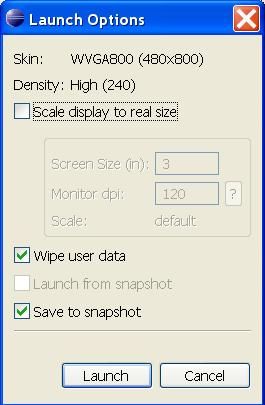
  5. Choose "Start..."
  6. Tick on "Wipe User Data"
  7. Press Launch
  8. Android emulator will be started. I notice it will take a longer time, which makes me think that keeping the user data is a form of caching -> faster loading. For subsequent faster loading, I think you can uncheck wipe user data.
  9. Success. Now close the AVD Manager and run your app. Case closed.
Notice something interesting? I keep bitching about Android, and I haven't even gotten started on my implementation. Fun times everyone~! Should I build the simpler game, and focus on the graphics, or take a longer time and build the other game? Arghz. Whatever it is, I will continue to hate on the emulator. Forever!!!

Skipping index file "...\ thumbs.db"

This got to be one of the lamest stupidest errors on earth. I am not sure whether I should even write the solution here since I think everyone will know how to fix it. But I have a policy on reporting all stupid Android errors and their solutions

If you encounter this error "Skipping index file ....\thumbs.db", it means you must have opened your drawable folder in Windows. In Eclipse, go to res\drawable, delete thumbs.db and recompile. QED.

Monday, January 24, 2011

Exception in thread "AWT-EventQueue-0" java.lang.NoClassDefFoundError: org/jdesktop/swingworker/SwingWorker

Cannot open the stupid draw9patch.bat in your Android tools folder?

Just before you become as cynical as me and think that Android (or Google) hates all developers (well THEY DO. Android used to let unappreciative users download paid apps for 1 whole day before returning! Now it is 15 min. Noch  crap. It's only USD1 to USD5 per app, and yet after all that effort, you see assholes returning your app BECAUSE THEY CAN!!), see solution from  Marco Massenzio(God bless this magnificent man)

(1) Download latest Swinglabs.zip from here.
(2) Unzip and dump the swinglabs.jar into "[your Android SDK folder]\tools\lib" folder.
(3) Double click on the draw9patch.bat folder in your "[your Android SDK folder]\tools" folder.

Voila! It works!

Then you can continue to torture yourself on using 9patch (this is from Google, duh). Use this friendlier tutorial here. I on the other hand, cannot be bothered, as I am in a dreadful rush to deliver what I owe to the nice guys at Ubinuri, whose patience I have terribly abused =P

Btw be careful with the 9 patch. You might end up with a resource.ap error, which happened to me. This is how to resolve the problem, though you will have to delete the 9.png. Yes, me the poor sod. After all that effort.

Monday, January 17, 2011

Some characters cannot be mapped using “Cp1252″ character encoding.

Thanks to burakddd.

Solution:
  1. Windows Menu –> Preferences –> General (expand it) –> Workspace (click on it).
  2. Look for a box “Text File Encoding”. Default will be “Cp1252″.
  3. Change radio to select other and select “UTF-8″ from combo box.
Of course this will not happen, if you dump all your text in strings.xml in the first place. *haha*
[?xml version="1.0" encoding="utf-8"?]  (replace the [] with <>)

Saturday, January 15, 2011

Error generating final archive: java.io.FileNotFoundException: xxx\bin\resources.ap_ does not exist

It's a unknown packaging problem.

Delete the error and the "Unparsed aapt error(s)!" error message that you are also likely to see. Then Go to Project-> Clean.

Choose "Clean projects selected below" and the project you are encountering problems in. Restart your Eclipse.

Updated!!!( 24th Jan 2011)
Had feedback from Bin (see comment below) that it does not work. I am grateful for his comment, even though I must admit it was rather grating on my ego. Oh ya, you got to restart your Eclipse. I forgot to mention it. 

I went to do some research on it. Seems like some of the people who cleaned the project like me, could solve the problem, and some couldn't. That is sehr unlucky I would say.

In that case, I recommend that you use the same old Eclipse tricks.
(1)  Undo your last change, esp if you did something to something in your res folder.
(2) Definitely restart your Eclipse. Be extra kiasu and delete the app in your phone or close off the emulator beforehand.
(3) Check that you have the correct Android target (right click on your project -> go to Properties->Android)
(4) Run the app again.

This is interesting, and somewhat ironic. After I typed this in, this stupid error happened to me too.  Again. (Damn you Android!!) This time cleaning did not help immediately. In fact it was because I tried the 9 patch png, which Android could not interpret correctly, therefore screwing  my R.java (I suspect) and all my other resources (which were declared in another layout xml). I would call it bad juju.

Anyway I had to wipe out the stupid png, before doing the above steps. The above cleaning solution then worked fine for me, in the end.

Oh yeah, if it works for you this time, please say so. If not, please also state your solution, so that others  (such as yours truly *haha*) can benefit from thy wisdom. TY! 

Googlers (I am assuming you are since you are coming from Mountain View, California) be a buddy, and provide the solution if you have one. thanks! 

Thursday, January 13, 2011

org.eclipse.core.internal.resources.ResourceException: Resource is out of sync with the file system: '//AndroidManifest.xml'. AndroidManifest.xml does not declare a Java package: Build aborted.

Ignore it, it's fucking bull.

Of course you can try the usual trick, which is to refresh the project... but if it doesn't work...

Most likely you have your emulator or phone up and running. Kill it, then delete the rows of errors in the error log and run as an android app again.

Friday, November 5, 2010

Error generating final archive: Debug certificate expired on

I opened my Eclipse today to a very friendly error "Error generating final archive: Debug certificate expired on [Date here]!"

Stupid. What you do is:

(1) Go to Preferences -> Android -> Build and see where is the Default Debug keystore stored. That would be the lame file called debug.keystore.

(2) Delete it.

(3) Run the app again. If not, clean the app or go to the error log and fix any error there.


Monday, October 25, 2010

emulator: ERROR: the user data image is used by another emulator. aborting

A lot of people say the way to get rid of this problem "emulator: ERROR: the user data image is used by another emulator. aborting" is to go to ADB server and type the following line: adb kill-server && adb start-server (total noobs, this means you use command prompt then go to your android sdk folder then tools folder e.g. C:\Android...\tools \, and run that line).
Also there are people who advise (in Eclipse) going to Run Configurations-> Target (of the application you are trying to emulate) and click "Wipe User Data" option.
Actually I tried both. The only way it works for me, is to go to Task Manager and kill off the Emulator.exe process. Simple, isn't it? Haha.

Wednesday, July 21, 2010

Syntax Error on token *something*. Identifier expected after this token

Hey fellow Noobs,

If you encounter this error when coding, this means... that entire line of code is not in any method. Move it into one and your problem is resolved.

Also,

if you are used to doing your stuff in MSSQL and MySQL like me, don't forget to Commit; when you are using Oracle. Otherwise it will only be stored in local cache, and nothing gets ahem commited to the database tables.


Friday, April 23, 2010

Android Struggle - Re-installation failed due to different application signatures

What do you do, when you encounter this?

Re-installation failed due to different application signatures.

You must perform a full uninstall of the application. WARNING: This will remove the application data!
Please execute 'adb uninstall [package name]' in a shell.
Launch canceled!

1) Open command prompt.
2) Go to [directory path]:\android-sdk-windows\tools
3) adb uninstall [package name]

Or you can always delete the app from the "Manage Applications" in your phone. Then install again.

LinkWithin

Related Posts with Thumbnails